Sponsor

  • This is default featured slide 1 title

    Go to Blogger edit html and find these sentences.Now replace these sentences with your own descriptions.This theme is Bloggerized by Lasantha Bandara - Premiumbloggertemplates.com.

  • This is default featured slide 2 title

    Go to Blogger edit html and find these sentences.Now replace these sentences with your own descriptions.This theme is Bloggerized by Lasantha Bandara - Premiumbloggertemplates.com.

  • This is default featured slide 3 title

    Go to Blogger edit html and find these sentences.Now replace these sentences with your own descriptions.This theme is Bloggerized by Lasantha Bandara - Premiumbloggertemplates.com.

  • This is default featured slide 4 title

    Go to Blogger edit html and find these sentences.Now replace these sentences with your own descriptions.This theme is Bloggerized by Lasantha Bandara - Premiumbloggertemplates.com.

  • This is default featured slide 5 title

    Go to Blogger edit html and find these sentences.Now replace these sentences with your own descriptions.This theme is Bloggerized by Lasantha Bandara - Premiumbloggertemplates.com.

Root Samsung Galaxy Fame S6810 And S6812 Dual On Android 4.1.2 Jelly Bean

     Hey, Today i am going to tell you in detail that how to root samsung galaxy Fame S6810 And S6812 Dual Based on Android 4.1.2 Jelly Bean.All Credit of this post is goes to +xda-developers  members.So lets start to root.

Requirements:

   
1]USB driver for Samsung galaxy Fame  Download
 2]Root Package Motochopper for Samsung galaxy Fame Download 


Procedure:  
  1. Install USB driver for Galaxy Fame from above link.
  2. Enable USB debugging mode and backup your important files.
  3. Make sure that charging of phone is more than 80%
  4. Download Motochopper.zip from above link.
  5. Connect your phone to PC using USB cable
  6. Extract Motochopper.zip.
  7. If you are on windows then run run.bat or if you are on linux run /.run.sh in terminal.
  8. Follow the all instructions on the screen.It will take some time to root.
  9. After complete the process just remove your USB and restart your phone.
  10. Now you have rooted susccesfully.
 
Disclaimer:
    Author Is Not Responsible For Any Kind of Damage To Your Phone And Illegal Use By Users.   


Regards,
Droid4ever.com


Share:

Use DroidVpn Premium Server For Free [Full Tutorial]


          Yoooo!!,Guys I am back with the new and very important tutorial.We all know that DroidVpn is most popular vpn in android.And also know that it gives only 100MB per day.So here i am going to tell you that how to use droidvpn premium account or server for free.Download Droidvpn for android from following link.

                                                 Download Droidvpn From Dropbox

You need to root your phone for installing droidvpn.Root your phone from here.For this tutorial we do not need newer version,so dont update this.In requirement we also need Android Terminal Emulator.Download it from following link.

                                    Download Android Terminal Emulator From Dropbox

Procedure: 
        
First install Android Terminal Emulator and open terminal and type su in terminal.It will give the root permission to the application.Shown in following screenshot:


Install given droidvpn 1.8.7b only and select any premium server what you want.As shown in following screenshot:


 Now click on the connect button.Now wait for some time till it will connected.See how it will look when it is connected:


 Now you established successfully connection.Now you see a one of the prompt.Just click on the upgrade later.


       After successfull connection just minimize the droidvpn and open the installed terminal emulator for android.Now go to terminal emulator and type in terminal ping google.com and hit enter button.See in following screenshot.


Now next go to task manager and kill droidvpn process .See following screenshot:


Note: 
  • Dont close droidvpn app only stop its process.
  • Do not close terminal emulator,keep it running in background


                 .Now You can surf unlimited internet using droidvpn premium servers.We know that premium server provides only 2MB data for free user.But now you can surf or download any amount of data with high speed.

   Use VPN in Android For Free Internet [Added New Config. Files]


Thanks for visiting us.Keep reading new tutorial related Android OS.


Regards,
Droid4ever.com
Share:

How To Download Apps And Games From Play Store On PC {Full Tutorial}


Droid4ever.com
Droid4ever.com
                  Hi guys, welcome back with new interesting and very important tutorial.Here now i am going to tell you that how to download android apps and games directly to PC from the play store.We know that there is no option on pc to download android apps,we need android phone to download apps from play store.So here i am going to tell you full procedure to download android apps and games from the play store with some necessary screenshots and software requires for that process.It also helpful for the android newbie and experts.
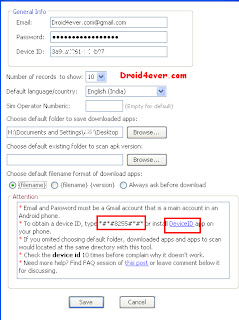
              First of all we need the software to download apps and games from play store directly,the software name as Real APK Leecher .Download full Real APK Leecher directly from here. Now download this software to your PC and extract it.You need Java Runtime latest version for this software beacause this software is based on Java. so just download it from here Java Runtime . Now run the .exe file in the Real APK Leecher  folder.The new window open,fill the all options like email,password and device ID.See below Screenshot,

{Click To Enlarge}

droid4ever.com
droid4ever.com


Make sure that email provide in this tab is must be register on play-store means the email is same as you use it in phone to access play store.Main thing is that to find the Device ID of your phone,for this just dial *#*#8255#*#*.If this code does not working then just download Android Device ID app from play store or from here,Android Device ID.Browse the location to store tha android apps rather leave it blank.See below screenshot for complete understanding for Device ID.

{Click To Enlarge} 
droid4ever.com
droid4ever.com


   Now click in the save button.Then Real APK Leecher main window will open.It take some seconds to login your account automatically.Some time it shows network error,then just click on ok and ignore it.When at right side of bottom it shows done then enter apps or game name that you want to download in your PC.See below screenshot for better understanding.

 {Click To Enlarge}
droid4ever.com 
droid4ever.com
Now list of apps or games are infront of you,Now just right click on the app that you wants to download and select click on download app option.Then the application will be start downloading as per shown in the bwlow screenshot,

{Click To Enlarge} 
droid4ever.com
droid4ever.com
Now application starts downloading,now you can see this app where you browse it.And you can upload this app anywhere without any error.Make sure that you have active internet connection.
           Here we end this tutorial,it took long time to post so if you share this tutorial anywhere just give this tutorial link for credit and must share it on facebook or other social sites using  below share button.Thanks for visiting and reading.Read our other important tutorial about android like android free internet,android vpn,etc.Thanks

Regards,
Droid4ever.com


Share:

The Adventures of Tintin v1.1.2 [APK+DATA] [Fully Unlocked] For Android


Description:
     Releasing the new excited and movie based game with the secret of unicorn.Now be ready for the secret of unicorn.Secret of  Unicorn now going to fold with this games.Now you can play thw race with camel,Solving thee interested puzzles and discover more.Tintin is doing this alone.He needs help of his friends through the game.You can control the dog of tintin and many more.Casual players and pros of all ages will enjoy the game.Now going to the world of pirates with tintin.Every building and character was carefully seen in stunning 3D graphics and animation that perfectly matches the style of the film.Now enjoy with this movie game with HD graphics.Here i provided game .apk file and data of The adventures of tintin.
Instructions:
  • 1.8 GB Free Space Required on SD card
  • First Install .Apk File
  • Unzip Data And Place Data Folder To  SD >> Android >> Data
  • Change language
  • Required OS: Android 2.3 
 Download:

Download Resumable .Apk File From Here >>  Download (5 MiB)

Download Resumable Data File From Here >>  Download (736 MiB)


Share:

[TuT]How To Root Sony Xperia Go


    Welcome back with new tutorial for on rooting your phone.As per request i have added this tutorial on blog.Now going to post a tutorial on How to Root Sony Xperia Go.Please leave your valuable comments after reading.

Requirements:

1]Download Flash tool for xperia Go {Do not use other flash tool} Flashtool 0.9.8.0
2]Download kernel file for root Kernel 6.1.1.B.1.10 
3]Download other Kernel file Kernel 6.1.1.B.1.54
4]Rooting Toolkit Download 
5]Pc And Xperia Go (lulz) 


Procedure:
1]We cannot root xperia Go directly so you need to flashtool 0.9.8.0, kernel 6.1.1.B.1.10 And kernel 6.1.1.B.1.54
2]On USB debugging mode in your xperia Go
3]Download Flashtool file from above to pc and install it and restart your pc for changes.
4] Download first kernel file no (2) and place in C:/Flashtool/Firmwares/Kernel File
5]Run Flashtool software and Click On Flashing icon and then select Flash mode.

                                                       {Click To Zoom}
6]Follow all the steps as shown in screenshot.
7]When you connect your phone to pc,use volume down key {DO NOT USE BACK BUTTON}
8]When flashing is done,disconnect phone from pc and just switch on it.
9]Now next step is root device,So download Rooting Toolkit (4) from above and extract it in pc.
10]Run the rooting toolkit and select normal mode.Carefully do all given process and instruction and complete the process.
11]After completing flashtool just flash another Kernel (3) {Dont Forgot To Flash It}
12]Now you have successfully rooted your phone.

 All Credit Goes To Nabeel @ +xda-developers 

Disclaimer:
    Author Is Not Responsible For Any Kind of Damage To Your Phone And Illegal Use By Users.  
 
Regards,
Droid4ever.com  
Share:

Popular Posts

Recent Posts

Unordered List

  • Lorem ipsum dolor sit amet, consectetuer adipiscing elit.
  • Aliquam tincidunt mauris eu risus.
  • Vestibulum auctor dapibus neque.

Sample Text

Lorem ipsum dolor sit amet, consectetur adipisicing elit, sed do eiusmod tempor incididunt ut labore et dolore magna aliqua. Ut enim ad minim veniam, quis nostrud exercitation test link ullamco laboris nisi ut aliquip ex ea commodo consequat.

Pages

Theme Support

Need our help to upload or customize this blogger template? Contact me with details about the theme customization you need.